Expert relative dates in Notion (formula + color coding)
But first, what is a relative date?
A relative date is a human-friendly way of expressing time compared to now, like “yesterday”, “tomorrow”, or “in 3 weeks”, instead of a fixed calendar date.
It is useful because it is faster to scan and understand, it stays accurate as time passes, and it helps you prioritise items at a glance (for example, what is overdue, what is due soon, and what can wait).
In Notion, relative dates can be calculated using the formula dateBetween().
👉 This guide shows how to use formulas to go from a basic output (like “1036 days”) to an expert relative date display that reads like “2 years ago”, “tomorrow”, or “in 3 hours”, with an optional color indicator.
What beginner relative dates look like
The simplest way to calculate a relative date in Notion is to use the following formula:
dateBetween( prop("Date"), today(), "days" )
You’ll get something like:
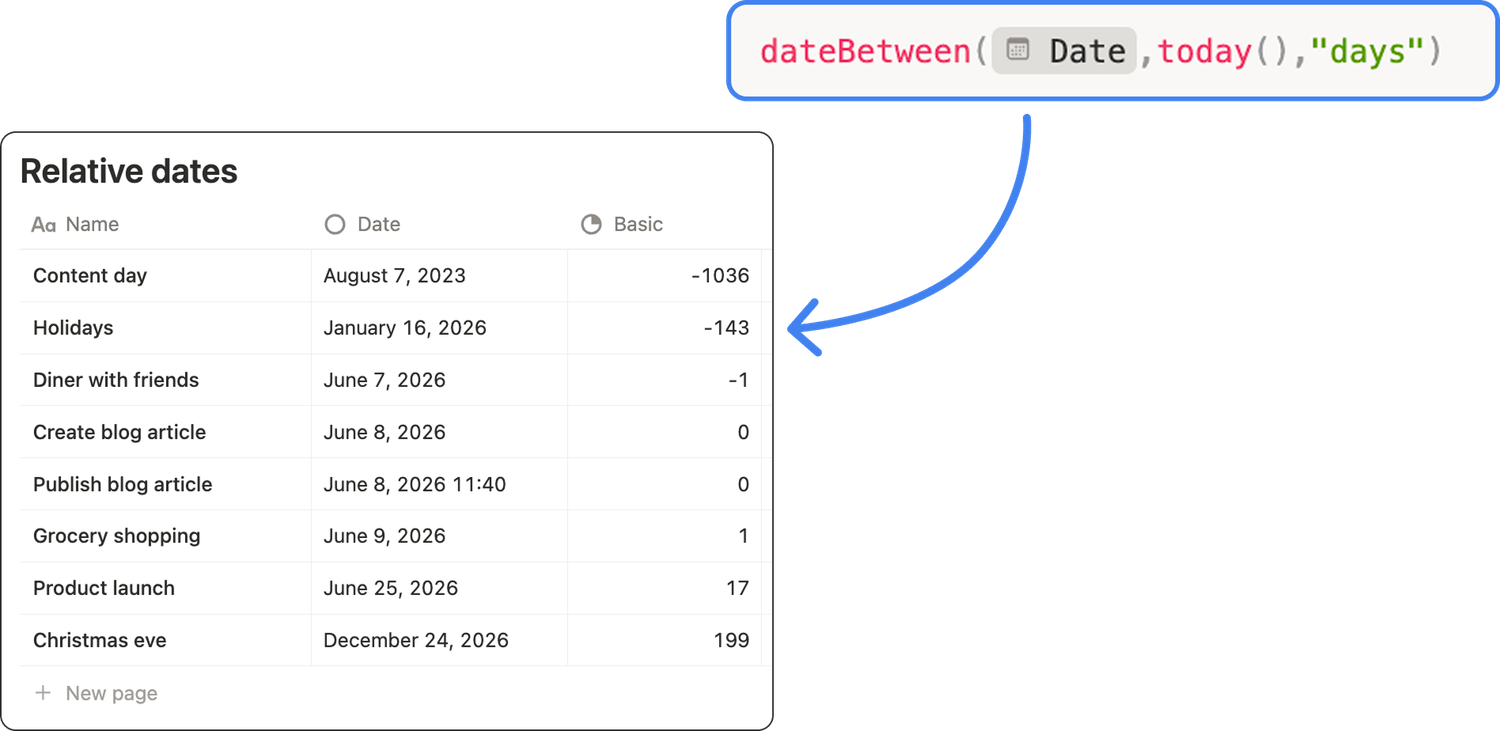
❌ This is not very readable, and it won’t be that useful.
If you’re a bit more comfortable with formulas in Notion, your relative date formula is probably a bit more complex, looking something like this:
if( dateBetween( prop("Date"), today(), "days" ) >= 0,
"In " + dateBetween( prop("Date"), today(), "days" ) + " days",
- dateBetween( prop("Date"), today(), "days" ) + " days ago"
)
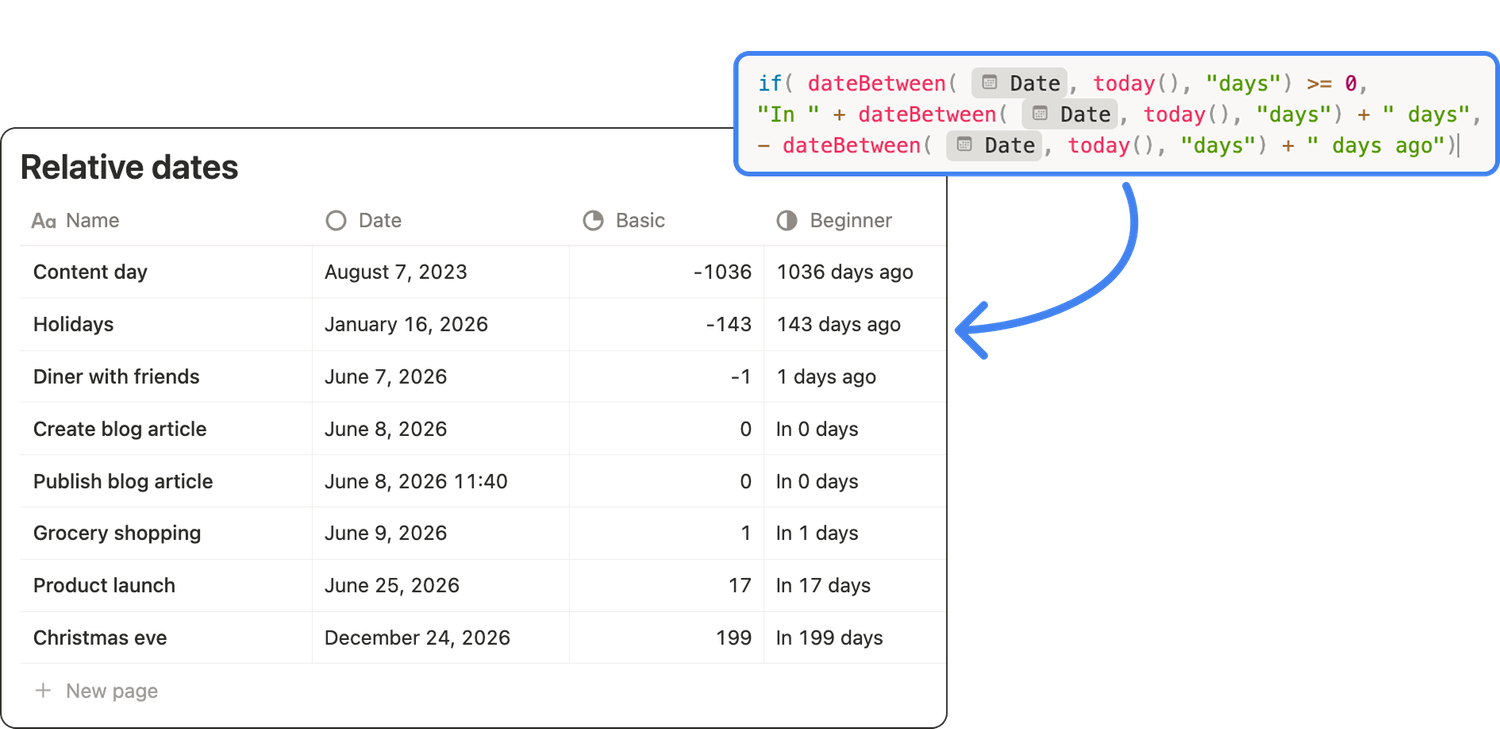
That’s already something you can use. But how do you interpret “143 days ago” at a glance? There is a better way. 👇
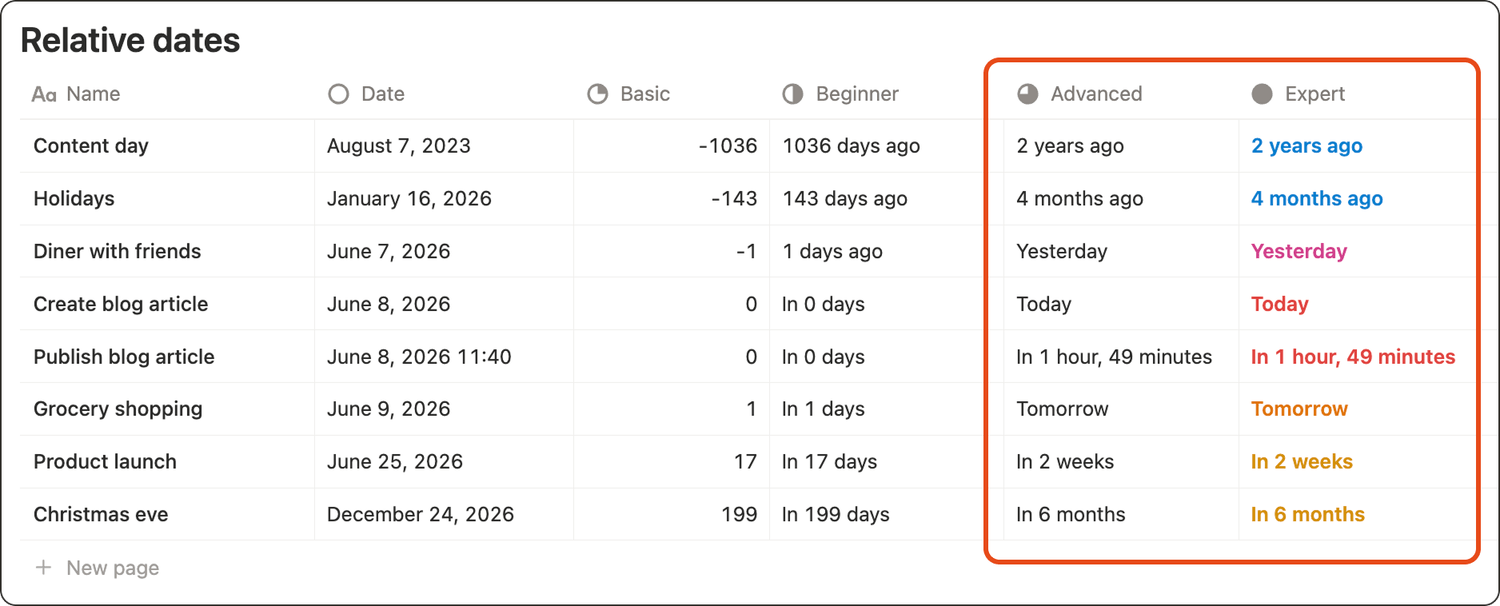
What expert relative dates look like
An expert display adapts to the time frame:
✅ 2 years ago instead of ❌ 1036 days ago
✅ Yesterday instead of ❌ 1 days ago
✅ In 3 hours when something is coming up soon
Optionally, it also uses a simple 🎨 colour code to scan urgency.
My step-by-step tutorial
1. Set up your database properties
Create (or confirm) these 2 properties in your database:
🗓️ Date property (named Date): this is the item date.
🧮 Formula property (named Relative date): the formula we will build, which will show the relative dates.
2. Understand the formula
The complex formula you’re going to set up will:
1️⃣ Compute the difference between today and your Date.
2️⃣ Decide if the date is in the past or future.
3️⃣ Pick the most readable unit (years, months, weeks, days, hours, minutes)
4️⃣ Handle special cases like today, tomorrow, and yesterday.
3. Copy/paste formula
Paste the following formula into your Relative date property.
⚠️ Important note: for the formula to work, your initial date property should be named "Date". If your date property is not named "Date", replace every "Date" in prop("Date") with your property name.
lets(
date, prop("Date"),
now, now(),
today, today(),
dateDay, if(empty(date), "", parseDate(formatDate(date, "YYYY-MM-DD"))),
dayDiff, if(empty(date), 0, dateBetween(dateDay, today, "days")),
absDays, abs(dayDiff),
isPastTime, date < now,
diffMinutes, abs(dateBetween(date, now, "minutes")),
diffHours, abs(dateBetween(date, now, "hours")),
textBeforeDay, if(dayDiff < 0, "", "In "),
textAfterDay, if(dayDiff < 0, " ago", ""),
textBeforeTime, if(isPastTime, "", "In "),
textAfterTime, if(isPastTime, " ago", ""),
ifs(
empty(date), "No date",
abs(dateBetween(dateDay, today, "years")) >= 1,
textBeforeDay
+ format(abs(dateBetween(dateDay, today, "years"))) + " year" + if(abs(dateBetween(dateDay, today, "years")) == 1, "", "s")
+ textAfterDay,
abs(dateBetween(dateDay, today, "months")) >= 1,
textBeforeDay
+ format(abs(dateBetween(dateDay, today, "months"))) + " month" + if(abs(dateBetween(dateDay, today, "months")) == 1, "", "s")
+ textAfterDay,
floor(absDays / 7) >= 1,
textBeforeDay
+ format(floor(absDays / 7)) + " week" + if(floor(absDays / 7) == 1, "", "s")
+ textAfterDay,
absDays >= 2,
textBeforeDay
+ format(absDays) + " days"
+ textAfterDay,
absDays == 1,
if(dayDiff < 0, "Yesterday", "Tomorrow"),
absDays == 0,
if(
and(not(empty(hour(date))), diffHours >= 1),
textBeforeTime
+ format(diffHours) + " hour" + if(diffHours == 1, "", "s")
+ if(diffMinutes - (diffHours * 60) == 0, "",
", "
+ format(diffMinutes - (diffHours * 60)) + " minute" + if(diffMinutes - (diffHours * 60) == 1, "", "s"))
+ textAfterTime,
if(
and(not(empty(hour(date))), diffMinutes >= 1),
textBeforeTime
+ format(diffMinutes) + " minute" + if(diffMinutes == 1, "", "s")
+ textAfterTime,
"Today")
)))
4. Add a simple color indicator
If you want to scan urgency quickly, you can twist the formula even more:
💙 Events in the past show in blue
🩷 Events from yesterday show in pink
❤️ Today shows in red
🧡 Tomorrow shows in orange
💛 Future dates show in yellow
Here’s what you need to copy and paste in your Relative date formula property:
lets(
date, prop("Date"),
now, now(),
today, today(),
dateDay, if(empty(date), "", parseDate(formatDate(date, "YYYY-MM-DD"))),
dayDiff, if(empty(date), 0, dateBetween(dateDay, today, "days")),
absDays, abs(dayDiff),
isPastTime, date < now,
diffMinutes, abs(dateBetween(date, now, "minutes")),
diffHours, abs(dateBetween(date, now, "hours")),
textBeforeDay, if(dayDiff < 0, "", "In "),
textAfterDay, if(dayDiff < 0, " ago", ""),
textBeforeTime, if(isPastTime, "", "In "),
textAfterTime, if(isPastTime, " ago", ""),
result,
ifs(
empty(date), "No date",
abs(dateBetween(dateDay, today, "years")) >= 1,
textBeforeDay
+ format(abs(dateBetween(dateDay, today, "years"))) + " year" + if(abs(dateBetween(dateDay, today, "years")) == 1, "", "s")
+ textAfterDay,
abs(dateBetween(dateDay, today, "months")) >= 1,
textBeforeDay
+ format(abs(dateBetween(dateDay, today, "months"))) + " month" + if(abs(dateBetween(dateDay, today, "months")) == 1, "", "s")
+ textAfterDay,
floor(absDays / 7) >= 1,
textBeforeDay
+ format(floor(absDays / 7)) + " week" + if(floor(absDays / 7) == 1, "", "s")
+ textAfterDay,
absDays >= 2,
textBeforeDay
+ format(absDays) + " days"
+ textAfterDay,
absDays == 1,
if(dayDiff < 0, "Yesterday", "Tomorrow"),
absDays == 0,
if(
and(not(empty(hour(date))), diffHours >= 1),
textBeforeTime
+ format(diffHours) + " hour" + if(diffHours == 1, "", "s")
+ if(diffMinutes - (diffHours * 60) == 0, "",
", "
+ format(diffMinutes - (diffHours * 60)) + " minute" + if(diffMinutes - (diffHours * 60) == 1, "", "s"))
+ textAfterTime,
if(
and(not(empty(hour(date))), diffMinutes >= 1),
textBeforeTime
+ format(diffMinutes) + " minute" + if(diffMinutes == 1, "", "s")
+ textAfterTime,
"Today"
)
),
""
),
color,
ifs(
empty(date), "",
and(dayDiff == 0, not(isPastTime)), "red",
and(dayDiff == 1, dayDiff > 0), "orange",
and(absDays <= 1, dayDiff < 0), "pink",
dayDiff < 0, "blue",
"yellow"
),
style(result, "b", color)
)
If you want your brain to scan information quickly, relative dates are a great option.
These formulas save you time by answering questions like: how far away is December 24th? And “in 199 days” is not a good answer…
My advanced and expert relative date formulas take 5 minutes to implement, but they can save you hours in the long run!
Latest blog posts
notion by moona
High-quality Notion workspaces for entrepreneurs with high standards.