Upgrade your duration display in Notion: steal my expert formula
But first, what is a duration?
A duration is the time between a start date and an end date.
For example, an event from 10:00 to 12:03 lasts 2 hours, 3 minutes. This is its duration.
In Notion, every duration starts with the same function: dateBetween(). It gives you the raw time difference.
The real upgrade is turning that raw number into a format your brain can scan at a glance.
👉 In this article, you will learn how to go from "123 minutes" to "2 hours, 3 minutes". And when you are dealing with longer date ranges, you will also be able to display something like "1 year, 1 day, 2 hours, 1 minute" instead of a huge, unreadable number (like "527,161 minutes").
What beginner durations look like
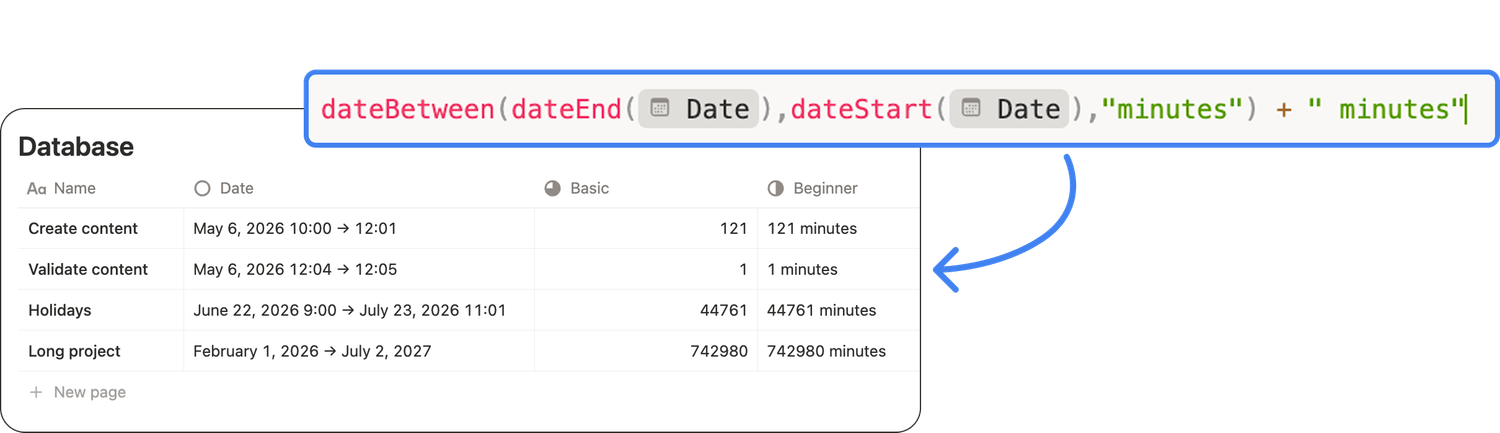
The most common way to calculate a duration in Notion is to return the difference in minutes:
dateBetween(dateEnd(prop("Date")), dateStart(prop("Date")), "minutes")
Using this formula, you’ll have these outputs:
⏱️ 123 minutes
⏱️ 1 minutes
⏱️ 0 minutes
⏱️ 527,161 minutes (for a very long date range)
The math is correct. But the display is not:
❌ Information is hard to scan at a glance.
❌ It does not scale for longer ranges.
❌ And it does not handle singular and plural correctly (hello, 1 minutes).
What advanced durations look like
An advanced display is already much more readable.
👉 It transforms "123 minutes" into "2 hours, 3 minutes" and uses singular when it needs to be used (bye, 1 minutes).
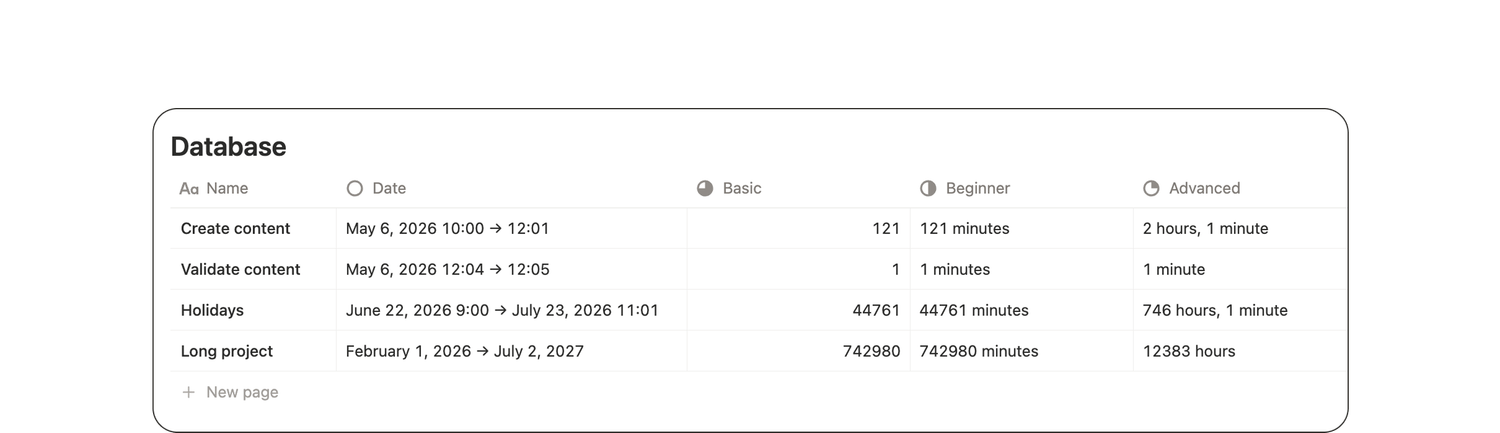
Here’s the formula you need to use to get this result. 👇
let(duration, dateBetween(dateEnd(prop("Date")), dateStart(prop("Date")), "minutes"),
if(or(duration == 0, empty(prop("Date"))),
empty(),
if(duration == 1,
duration + " minute",
if(duration < 60,
duration + " minutes",
floor(duration / 60)
+ if(floor(duration / 60) == 1, " hour", " hours")
+ if(subtract(duration, floor(duration / 60) * 60) == 0, "", ", ")
+ if(subtract(duration, floor(duration / 60) * 60) == 0, "", subtract(duration, floor(duration / 60) * 60)
+ if(subtract(duration, floor(duration / 60) * 60) == 0, "", if(subtract(duration, floor(duration / 60) * 60) < 2, " minute", " minutes"))
)))))
This version focuses on hours and minutes. It is perfect for events happening within a day.
But what if your date range is much longer? A trip, a project phase, a long challenge... Switching from minutes to hours helps, but not enough. Because "12,383 hours" is not much more useful than "527,161 minutes", isn’t it?
What expert durations look like
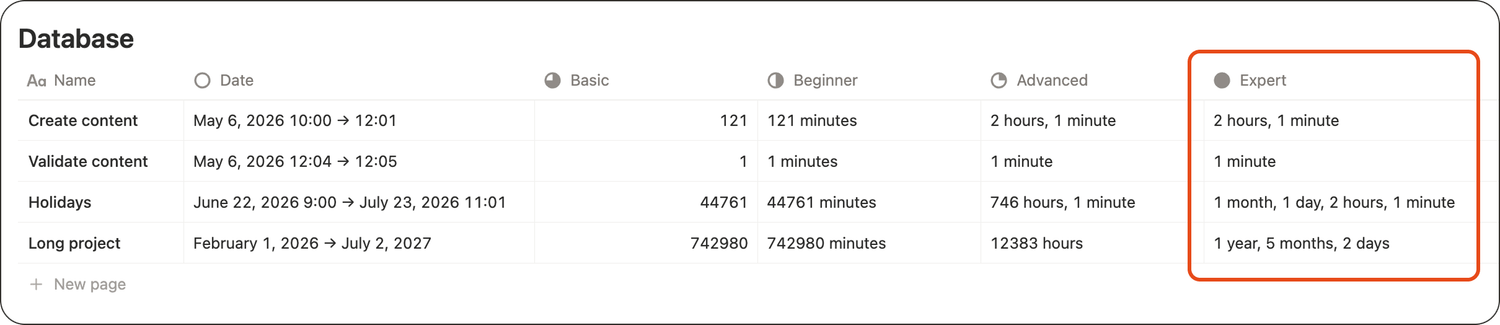
My expert duration formula goes one step further by automatically switching to the most readable unit, from minutes to years.
Here are the kind of outputs it’ll give you:
✅ 1 minute
✅ 45 minutes
✅ 2 hours, 3 minutes
✅ 3 days, 2 hours, 1 minute
✅ 2 weeks
✅ 1 year, 1 day, 2 hours, 1 minute
✅ 1 year, 5 months, 2 days
You keep a highly precise duration (down to the minute), but with much better readability.
My expert formula to copy and paste into your Notion workspace
You’ll first need to make sure your database has a date property named "Date".
⚠️ If your date property is not named "Date", replace every "Date" in prop("Date") with your property name.
Then add a formula property, name it "Duration" and copy/paste this exact text into it:
lets(
date, prop("Date"),
start, dateStart(date),
end, dateEnd(date),
noStartTime, and(empty(hour(start)), empty(minute(start))),
noEndTime, and(empty(hour(end)), empty(minute(end))),
noDuration, or(empty(date), empty(start), and(start == end, noStartTime, noEndTime)),
noTime, and(start != end, noStartTime, noEndTime),
durationMinutes, dateBetween(end, start, "minutes"),
endCalculation, if(and(noStartTime, noEndTime), dateAdd(end, 1, "days"), end),
yearsRaw, abs(dateBetween(endCalculation, start, "years")),
years, if(dateAdd(start, yearsRaw, "years") > endCalculation, yearsRaw - 1, yearsRaw),
yearsAnchor, dateAdd(start, years, "years"),
monthsRaw, abs(dateBetween(endCalculation, yearsAnchor, "months")),
months, if(dateAdd(yearsAnchor, monthsRaw, "months") > endCalculation, monthsRaw - 1, monthsRaw),
monthsAnchor, dateAdd(yearsAnchor, months, "months"),
remAfterMonths, abs(dateBetween(endCalculation, monthsAnchor, "minutes")),
weeks, floor(remAfterMonths / (60 * 24 * 7)),
remAfterWeeks, remAfterMonths - weeks * (60 * 24 * 7),
days, floor(remAfterWeeks / (60 * 24)),
remAfterDays, remAfterWeeks - days * (60 * 24),
hours, floor(remAfterDays / 60), minutes,
remAfterDays - hours * 60,
yearLabel, " year" + if(years > 1, "s", ""),
monthLabel, " month" + if(months > 1, "s", ""),
weekLabel, " week" + if(weeks > 1, "s", ""),
dayLabel, " day" + if(days > 1, "s", ""),
hourLabel, " hour" + if(hours > 1, "s", ""),
minuteLabel, " minute" + if(minutes > 1, "s", ""),
dayPart,
if(years > 0, format(years) + yearLabel, "")
+ if(and(years > 0, months > 0), ", ", "")
+ if(months > 0, format(months) + monthLabel, "")
+ if(and(or(years > 0, months > 0), weeks > 0), ", ", "")
+ if(weeks > 0, format(weeks) + weekLabel, "")
+ if(and(or(years > 0, months > 0, weeks > 0), days > 0), ", ", "")
+ if(days > 0, format(days) + dayLabel, ""),
timePart,
if(hours > 0, format(hours) + hourLabel, "")
+ if(and(hours > 0, minutes > 0), ", ", "")
+ if(minutes > 0, format(minutes) + minuteLabel, ""),
ifs(
noDuration, "",
durationMinutes <= 24 * 60,
if(hours >= 1, format(hours) + hourLabel + if(minutes == 0, "", ", " + format(minutes) + minuteLabel), format(minutes) + minuteLabel),
if(dayPart == "", timePart, if(timePart == "", dayPart, dayPart + ", " + timePart))))
You now have adaptive durations you can actually use day to day. 🥳
One last word
In Notion, the calculation is rarely the problem. The display is.
A duration that reads "527,161 minutes" (or even "12,383 hours") might be technically correct, but it is not actionable. Your brain cannot make decisions with it.
Once you format durations in a human-friendly way, the exact same data becomes useful:
✅ You can scan a database in seconds,
✅ Understand effort and timelines instantly,
✅ And compare items without doing mental math.
So yes: display is just as important as the data itself. 😉
Latest blog posts
notion by moona
High-quality Notion workspaces for entrepreneurs with high standards.