6 custom progress bars to try in Notion
Progress bars are one of the easiest ways to visualise progress in a Notion database.
In my last article, I explained how to build a basic progress bar from scratch.
In this one, you’ll learn how to customise it with different styles.
Circles, squares, hearts, a cursor, emojis… Below are 6 layouts you can copy/paste depending on the look you want.
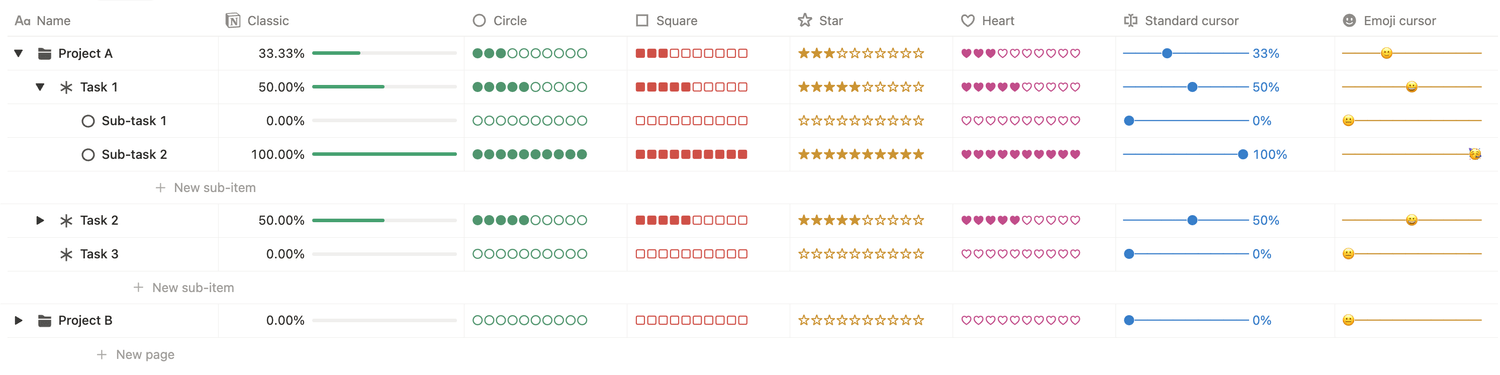
For this tutorial, we’ll reuse the database from last week so all the calculations are already set up. If you haven’t built your progress bar yet, I recommend taking 5 minutes to do it first: click here.
In this database, add a new formula property, open the formula editor, and copy and paste one of the formulas below.
🟢 Circle style
lets(total, 10, filled, floor(prop("Progress bar") * total),
("●".repeat(filled) + "○".repeat(total - filled))
.style("green"))
🟥 Square style
lets(total, 10, filled, floor(prop("Progress bar") * total),
("■".repeat(filled) + "□".repeat(total - filled))
.style("red"))
⭐️ Star style
lets(total, 10, filled, floor(prop("Progress bar") * total),
("★".repeat(filled) + "☆".repeat(total - filled))
.style("yellow"))
💖 Heart style
lets(total, 10, filled, floor(prop("Progress bar") * total),
("♥︎".repeat(filled) + "♡".repeat(total - filled))
.style("yellow"))
📍 Cursor style
lets(position, round(prop("Progress bar") * (10 - 1)),
("─".repeat(position) + "●" + "─".repeat((10 - 1) - position) + " " + prop("Progress bar").round(2) * 100 + "%")
.style("blue"))
🥳 Emoji style
lets(position, round(prop("Progress bar") * (10 - 1)),
("─".repeat(position) + ifs( prop("Progress bar") == 0, "😐", prop("Progress bar") < 0.5, "🙂", prop("Progress bar") == 1, "🥳", "😀" ) + "─".repeat((10 - 1) - position)) .style("yellow"))
That’s it! Your custom progress bar is ready.
Feel free to tweak the symbols, swap the characters, or change the colors to match your setup.
Latest blog posts
notion by moona
High-quality Notion workspaces for entrepreneurs with high standards.